
Features of a thumbnail generator that starts with the video
Everything below is included in the one license. There are no add-ons, no tiers and no watermark on what you make.
1. Capture still frames from your videos
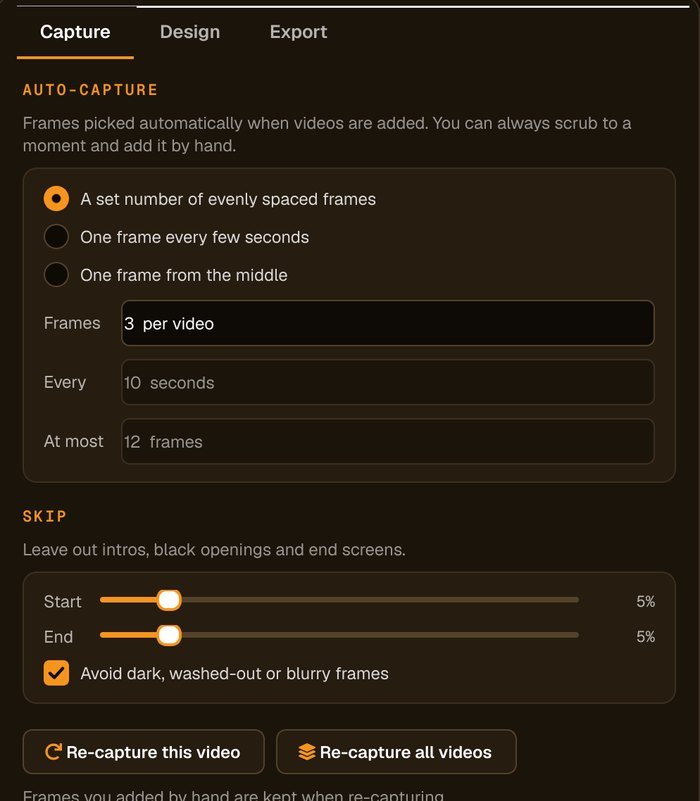
Advanced Thumbnailer opens the video and lets you save any frame as an image at the video's full resolution. Drag the slider to the moment you want and click Add this frame, or let auto-capture do the choosing:
- A set number of evenly spaced frames from each video, up to a limit you choose.
- One frame every few seconds, for long recordings and streams.
- One frame from the middle, for a quick single thumbnail per file.
You can tell it to skip the opening and closing part of each video, so intros and end screens are left out, and to avoid dark, washed-out or blurry frames. Re-capture one video or all of them with new settings at any time; frames you picked by hand are kept.
2. Design the thumbnail once
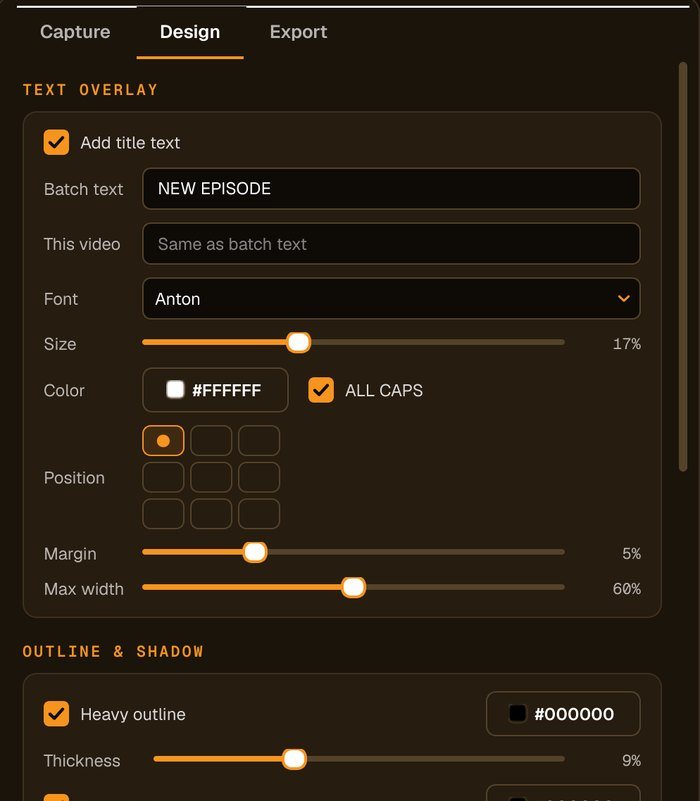
Title text
Type one title for the whole batch, or a different one for a single video. Choose the font, size and colour, switch on ALL CAPS, and place it in any of nine positions with its own margin and maximum width.
Outline and shadow
A heavy outline with adjustable thickness and a drop shadow keep the words readable even when the thumbnail is shown at a small size in a list of videos.
Your logo or watermark
Add your channel logo once and set its size, position and opacity. It is stamped on every thumbnail in the run.
Picture adjustments and crop
Lift brightness, contrast and saturation, sharpen the frame, and crop to 16:9, 9:16, 1:1 or 4:3. Drag the crop in the preview to frame the subject just right.
3. Export every size in one run
Tick the sizes you need and each one is made from the same frame, so a single moment becomes a full set of custom video thumbnails. The presets include:
| Where it's used | Size (pixels) | Shape |
|---|---|---|
| YouTube | 1280 × 720 | 16:9 widescreen |
| Twitch | 1920 × 1080 | 16:9 widescreen |
| Vimeo, DailyMotion, Rumble, Odysee | 1280 × 720 | 16:9 widescreen |
| Facebook video | 1280 × 720 | 16:9 widescreen |
| Instagram post | 1080 × 1080 | 1:1 square |
| Instagram Reel cover, TikTok | 1080 × 1920 | 9:16 vertical |
| X (Twitter) | 1200 × 675 | 16:9 widescreen |
| 1200 × 628 | 1.91:1 landscape | |
| OnlyFans | Cover, profile and post | Each at its own size |
| Custom | Any width and height | Your choice |
Before the run starts, a counter shows exactly how many thumbnails will be made. Files can be named after the video, a prefix, the platform, a number or the date, and saved as JPG or PNG. You can preview every size before exporting.
4. Opens the files you already have
| Video | MP4, MOV, AVI, MKV, WMV, M4V, FLV and WebM |
| Images | JPG, PNG, GIF, BMP, TIFF and WebP stills |
| Saves as | JPG or PNG |
Whole folders can be added at once, so a back catalogue or a new series is one batch rather than dozens of separate jobs.
5. Specifications
| Version | 10.26 |
| Works on | Windows 10 and Windows 11 |
| Internet | Not needed to make thumbnails. Nothing is uploaded. |
| Size presets | 18, plus any custom size |
| License | One-time payment, 1 PC |
| Updates | Free |
| Watermark | None |
Want to see the steps in order? Read how it works, or check the FAQ.
$29.95 one-time payment · every feature included
Order Now »